How to Connect Groww to TradeLyser
Connect Groww to TradeLyser and your Groww stock and F&O trades flow into your trading journal without downloading reports or copying rows into a spreadsheet. TradeLyser uses Groww's official Trade API with TOTP login: you generate a TOTP token on Groww's API Keys page, add it to an authenticator app, and enter the token and the current 6-digit code in TradeLyser. There is no redirect URL to configure. Setup takes about 10 minutes.
Once connected you can:
- Sync Groww trades, including F&O, automatically every weekday night, or with one click whenever you want them sooner.
- Turn on Live Insights so Groww fills appear as they happen.
- Track P&L, win rate, fees and tax for every Groww trade on the TradeLyser dashboard.
What you need
| Requirement | Where to get it |
|---|---|
| An active Groww account with stocks or F&O enabled | groww.in |
| An active Groww Trade API subscription | Groww Trade API. Groww lists its current plans there. |
| A Groww TOTP token | Groww Cloud API Keys, created in Step 1 below |
| An authenticator app (for example Google Authenticator or Microsoft Authenticator) | Your phone's app store |
| A TradeLyser account | app.tradelyser.com (a free trial is available) |
Groww's API Keys page can create two kinds of credentials. TradeLyser needs the TOTP token, chosen from the dropdown next to Generate API key. A regular API key and secret will not work in TradeLyser's TOTP Token field. This mix-up is the most common reason a Groww connection fails.
Step 1: Generate a Groww TOTP token
- Make sure your Groww Trade API subscription is active. You can subscribe from the Groww Trade API page.
- Open the Groww Cloud API Keys page and log in with your Groww account.
- Open the dropdown next to the Generate API key button and choose Generate TOTP token.
- Enter a name you will recognise, such as
TradeLyser, and click Continue. - Copy the TOTP token and keep it somewhere safe. Treat it like a password.
- Scan the QR code with your authenticator app. The app now shows a new 6-digit code for Groww every 30 seconds.
Groww lists the TOTP flow as having no expiry, so you only create the token once. You can manage or delete your tokens from the same API Keys page.
Step 2: Add your Groww account in TradeLyser
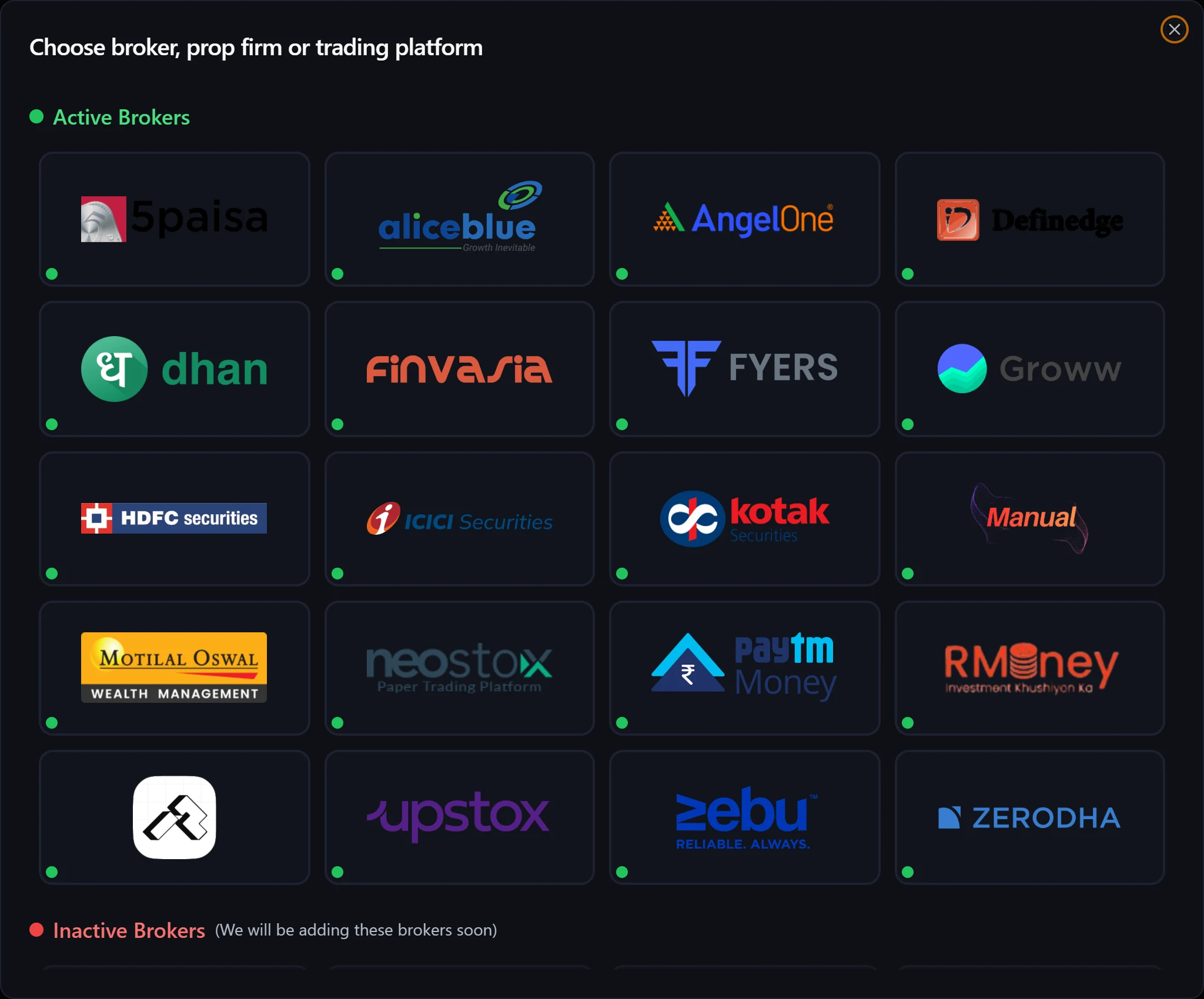
- In TradeLyser, open Accounts and click Add Account.
- Choose Groww. Brokers with a green dot are supported for Auto Sync.
- Choose a calculation method. This decides how buys and sells are matched into trades:
- FIFO (first in, first out) is recommended. It matches how most Indian brokers report P&L.
- LIFO matches the most recent buy first.
- WA uses the weighted average price.
- Choose Auto Sync as the import method.
- Enter an account name (for example
Groww – F&O). - Paste the token from Step 1 into TOTP Token.
- Open your authenticator app and type the current 6-digit Groww code into TOTP Code.
- Click Connect and Save Account. TradeLyser logs in to Groww and shows Groww Connected Successfully.
The calculation method and import method cannot be changed after the account is created. If you need a different method later, add a second Groww account in TradeLyser.
Step 3: Sync your Groww trades
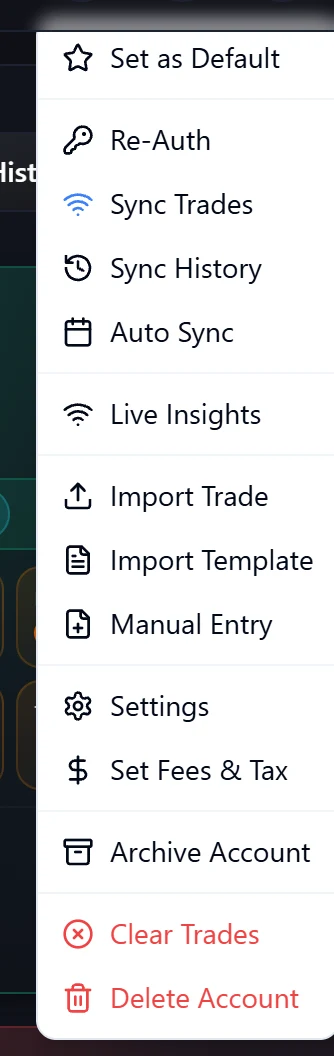
Open the ⋯ actions menu on your Groww account card:
| Action | What it does |
|---|---|
| Sync Trades | Fetches today's orders from Groww. You can choose to skip fees, taxes or slippage, then click Fetch Orders. Large syncs run in the background and you get a notification when they finish. |
| Re-Auth | Opens Refresh Groww Session, where you enter a fresh TOTP code. |
| Live Insights | Connects a live order feed for Groww, so fills appear as they happen. |
| Import Trade | Imports a Groww trade file, for trades from before you connected. |
TradeLyser also syncs your Groww account automatically every Monday to Friday at 10:30 pm IST, as long as your Groww session is still valid at that time. Run Sync Trades whenever you want today's trades in TradeLyser sooner, for example after your last order of the day is executed. Sync History is not available for Groww, so older trades come from a file (see below).
After a sync, click the refresh icon in the TradeLyser header so every dashboard widget picks up the new trades straight away.
Refresh your Groww session every day
Groww Trade API sessions expire daily at 6:00 AM IST, so the account card shows Re-auth required each morning. Refresh the session before 10:30 pm so the nightly sync can run, and before any manual sync. TradeLyser stores your TOTP token, so re-authenticating only needs a new code:
- Open the ⋯ actions menu on the Groww account and choose Re-Auth.
- In the Refresh Groww Session pop-up, type the current 6-digit code from your authenticator app into TOTP Code.
- Click Refresh Session.
The account card's Token field shows how long the current session remains valid.
If your Groww session has expired, TradeLyser reminds you with a bell notification and an email in the morning (around 8:30 am) and a last call around 9 pm, so you can refresh it before the 10:30 pm sync. Accounts that are still logged out at 10:30 pm are skipped that night. To stop these reminders for an account, choose Turn off login reminders in its ⋯ actions menu.
Import older Groww trades from a file
Auto Sync covers the current day, so to bring in trades from before you connected, download your order history from Groww's reports and upload it with Import Trade. Groww files go through TradeLyser's generic parser, with the TradeLyser CSV template as the fallback. See Import Groww trades into TradeLyser for the full steps.
Troubleshooting Groww connection issues
| Problem | Fix |
|---|---|
| TOTP Token Required | Paste the TOTP token from Groww's API Keys page into TOTP Token. |
| TOTP Code Required or the code is rejected | Enter the code currently shown in your authenticator app, before it changes. Make sure your phone's clock is set automatically, because TOTP codes depend on the correct time. |
| Groww authentication failed | Check that you copied a TOTP token, not an API key, and that your Groww Trade API subscription is active. If needed, generate a new TOTP token and connect again. |
| Groww TOTP Token is missing during Re-Auth | Edit the account and enter your TOTP token again. |
| Account shows Re-auth required | The daily Groww session has expired. Use Re-Auth from the ⋯ menu. |
| Today's trades are missing | Run Sync Trades after the order is executed (or wait for the 10:30 pm nightly sync), then click the header refresh icon. |
| Older trades are missing | Import them from a Groww order history file with Import Trade. |
Still stuck? Follow Troubleshoot broker connection or Trades not syncing, or email support@tradelyser.com.
Frequently asked questions
Does TradeLyser support Groww?
Yes. Groww is supported for Auto Sync through the official Groww Trade API with TOTP login, and for importing Groww order history files.
Is TradeLyser a good trading journal for Groww?
TradeLyser syncs your Groww trades, matches buys and sells into trades, and adds journaling, tags and analytics on top, so you can review your Groww stock and F&O trading in one place.
Do I need a Groww API subscription?
Yes. Groww requires an active Trade API subscription before you can generate a TOTP token. Check the Groww Trade API page for current plans.
Do I need to enter a code every day?
Yes. Groww sessions expire at 6:00 AM IST each day. Before 10:30 pm, use Re-Auth and enter a fresh 6-digit code from your authenticator app so the nightly sync can update your trades. You don't need to generate a new TOTP token.
Can I connect more than one Groww account?
Yes. Add each Groww account separately from Accounts → Add Account. The number of accounts you can add depends on your TradeLyser plan. See Add multiple accounts.