Trade Insights: See Where Your P&L Comes From
Trade Insights slices your closed trades by time of day, holding time, day of week, price range, instrument, symbol, tag and cost, then highlights the patterns that matter. It answers the questions a P&L total can't: which hour loses money, which underlying is your edge, and how much your charges really cost you. This guide covers how the section works and its first six tabs: P&L, Win Rate, Tags, Symbols, Trade Count and Fees & Tax.
Availability: Pro plan. Open it at app.tradelyser.com/trades-analysis/profit-loss, or from Insights & AI → Trade Insights in the sidebar.
How Trade Insights works
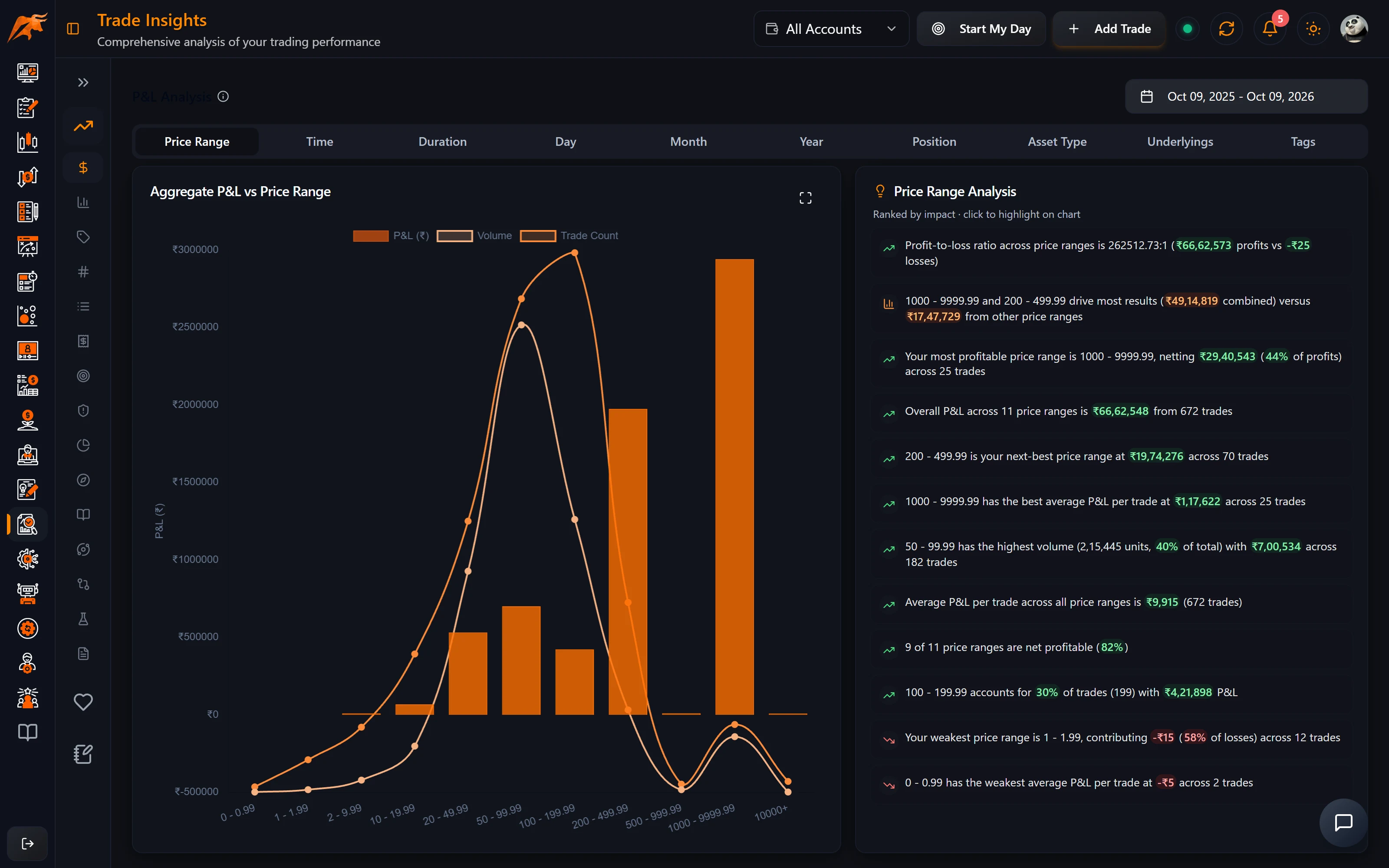
- The menu on the left has three groups: Trade Analysis (15 tabs), Health Analysis (WHOOP data) and Notes Analysis (AI analysis of your notes). This guide and its three companions cover Trade Analysis.
- Every Trade Analysis tab uses the date range at the top right (last 12 months by default) and the account selected in the header. Trades are filtered by their exit date and grouped by their entry time.
- Most tabs show a chart on the left (click the expand icon for full screen) and an Insights card on the right.
- Insights come from TradeLyser's rules engine: no AI and no credits. They are ranked by how large the effect is and how many trades support it. Pattern insights need at least 5 trades in a bucket.
- Click an insight to highlight the matching bar. On some tabs (P&L by duration and day, Expectancy, Concentration) it also opens the matching trades, each linking to Trade Details.
- Only closed trades are analysed, up to 10,000 in the selected range.
Terms used across every tab
| Term | Meaning in Trade Insights |
|---|---|
| Win / Loss | Net P&L above zero / below zero. Breakeven trades count in totals but are neither. |
| Long / Short | Whether the trade opened with a buy or a sell. |
| Underlying | Options and futures are grouped under their index or stock (all NIFTY options count as NIFTY). Underlying charts show the top 20 by P&L. |
| Sessions | Pre-open 9:00–9:15, Open 9:15–11:00, Midday 11:00–14:00, Close 14:00–15:30, otherwise After hours. |
| Duration buckets | 0–1 min, 1–5 min, 5–15 min, 15–30 min, 30–60 min, 1–2 h, 2–8 h, 8–24 h, 1+ days. |
P&L Analysis
Question it answers: Where does my money come from, and where does it leak?
P&L Analysis shows your total net P&L grouped by ten sub-tabs:
| Sub-tab | Groups your net P&L by |
|---|---|
| Price Range | Entry price band of the instrument |
| Time | Hour of entry |
| Duration | How long you held the trade |
| Day | Day of the week |
| Month / Year | Calendar month or year |
| Position | Long or short |
| Asset Type | Equity, futures, options and so on |
| Underlyings | The index or stock behind each trade |
| Tags | Your setup, mistake and emotion tags |
On the Tags sub-tab, a trade with several tags is counted under each tag, so tag totals can add up to more than your net P&L.
If the Time tab shows 13:00–14:00 at −₹18,400 over 42 trades, try a two-week rule of no new entries after 1 PM, then check this chart again. For more on reading P&L by period and instrument, see P&L by period and symbol.
Win Rate
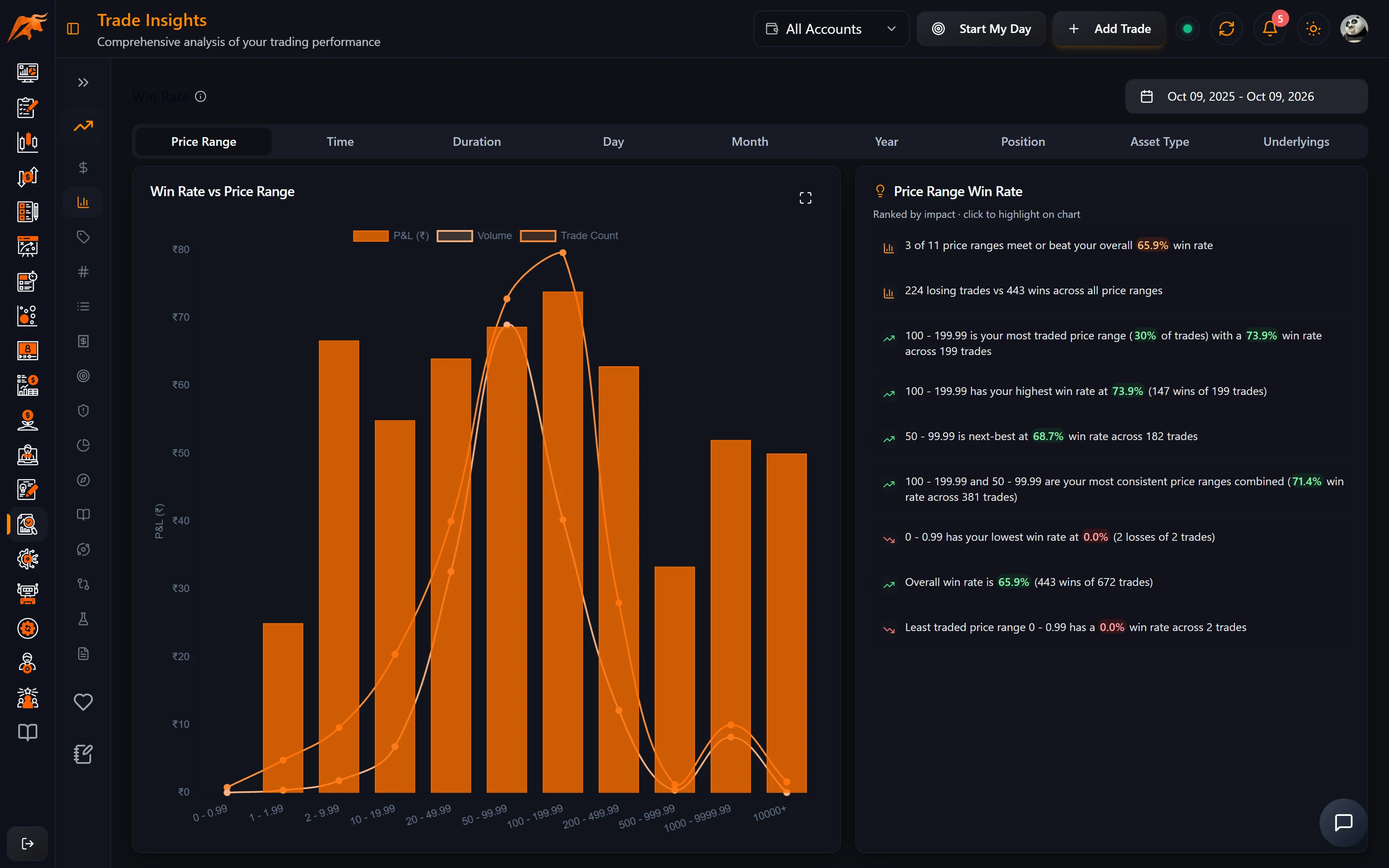
Question it answers: When and where do I actually win?
Win Rate uses the same slices as P&L Analysis (except Tags) and shows wins divided by trades in each bucket. It is the fastest way to spot, say, a 30% win rate on trades held under a minute.
Always read win rate together with Expectancy. A 70% win rate with small wins and large losses still loses money. The www guide How to analyse win rate explains why.
Tags and Symbols
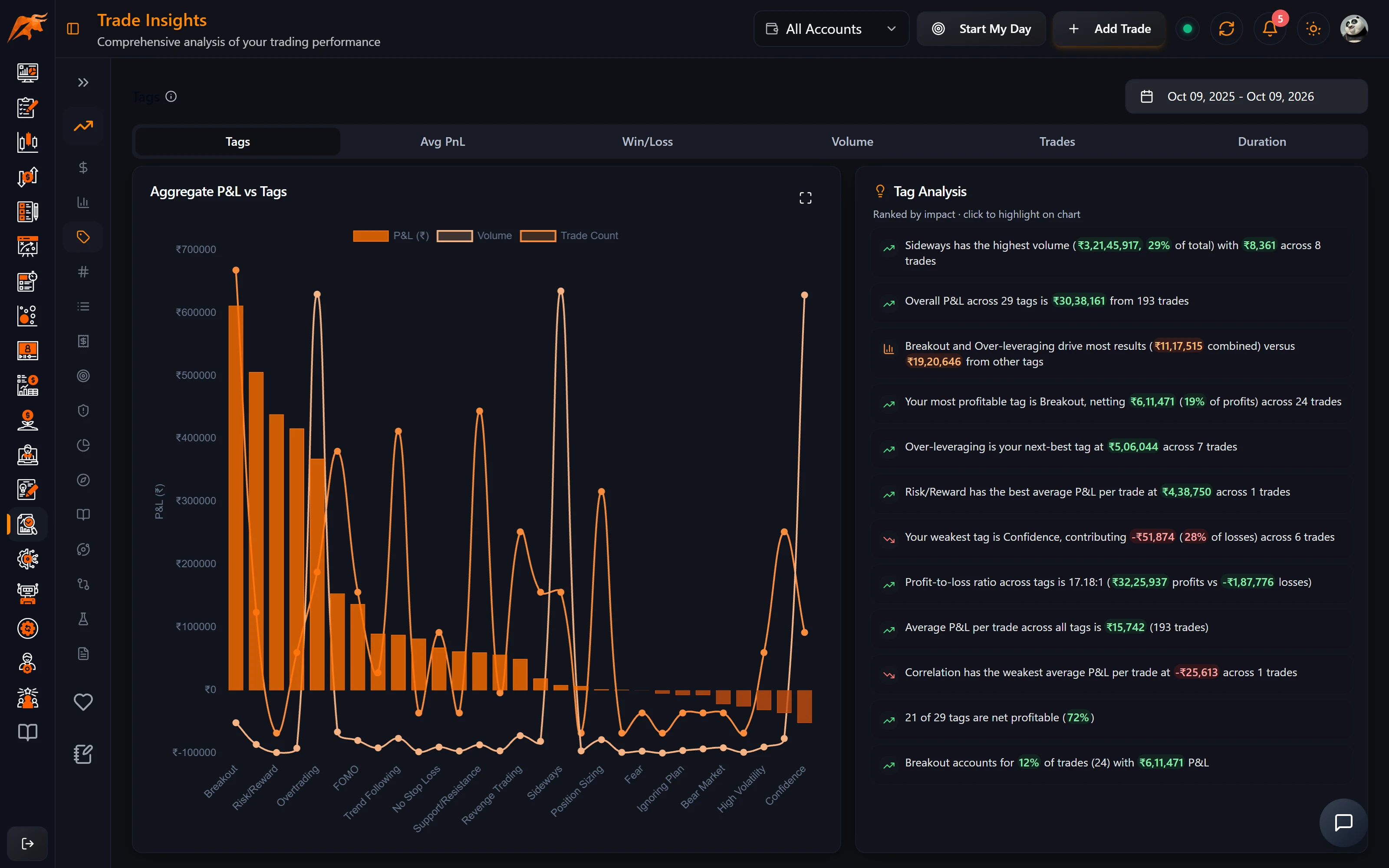
Tags shows which of your setup, mistake and emotion tags make or lose money. Its sub-tabs are:
| Sub-tab | What it shows per tag |
|---|---|
| Total P&L | Net P&L of all trades carrying the tag |
| Average P&L | Net P&L per trade |
| Win / loss counts | Number of winning and losing trades |
| Volume | Quantity × entry price |
| Number of trades | How often you used the tag |
| Average duration | Typical holding time |
Tags needs tags on your trades. Without them the charts are empty. Add them from the Trades Log or set up your own list in Create custom tags.
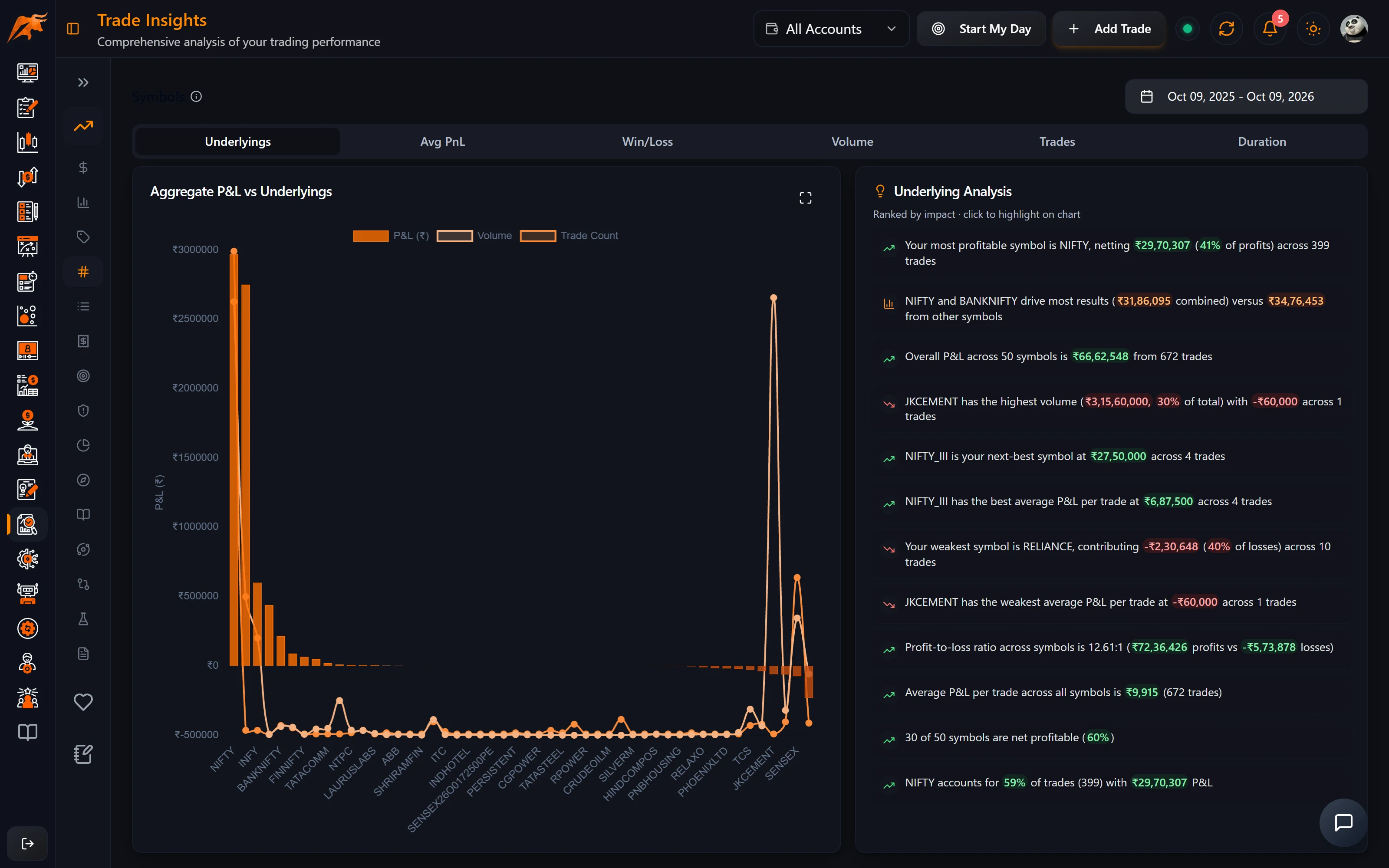
Symbols shows the same measures by underlying, so you can see which instruments are your edge and which are your leak.
If BANKNIFTY carries most of your trades but has a negative average P&L while NIFTY is steadily positive, cut your BANKNIFTY size or shift your focus to NIFTY. If the FOMO entry tag is −₹22,000 over 15 trades, add "Am I chasing?" to your pre-trade checklist.
Tags are only as useful as your tagging habit. The www article Tags, widgets and dashboard metrics covers how to build a tag list worth analysing.
Trade Count and Fees & Tax
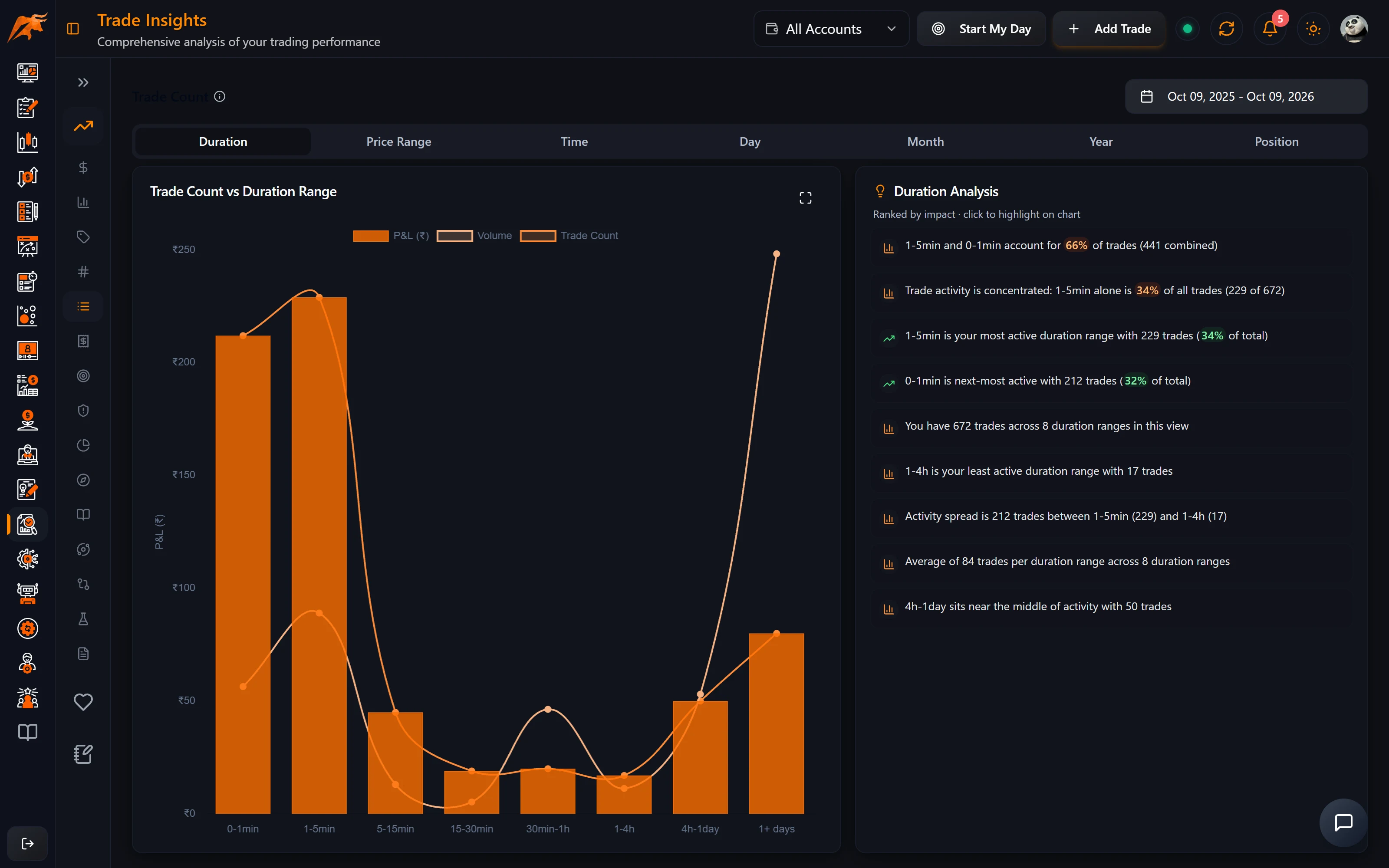
Trade Count shows where your activity is concentrated: by duration, price range, time, day, month, year and position. A busy bucket is not the same as a profitable one. Insights flag overtrading when a busy bucket doesn't make money.
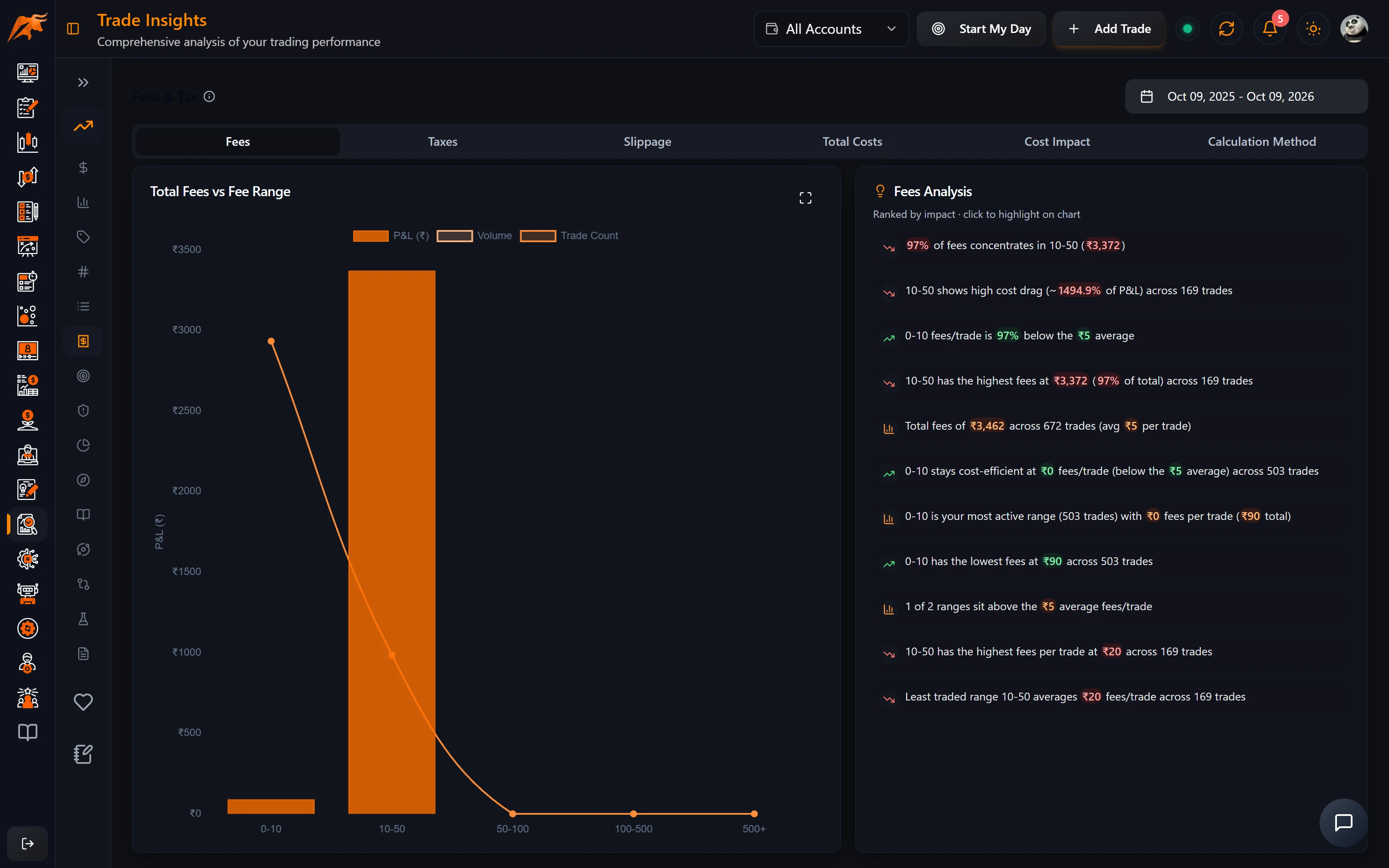
Fees & Tax shows what your trading costs you:
| Sub-tab | What it shows |
|---|---|
| Fees / Taxes / Slippage | Totals grouped by the size of the charge per trade. |
| Total Costs | Fees + taxes + slippage per trade, grouped by size. |
| Cost Impact | Number of trades by costs as a % of the trade's P&L (0–1%, 1–5%, 5–10%, 10–20%, 20%+). |
| Calculation Method | Trades by FIFO, LIFO or weighted average. |
Many trades in the 20%+ cost-impact bucket means your average move is too small for your charges. Aim for bigger targets or trade fewer lots.
This tab needs fees and taxes on your trades. Set them under Accounts → Set Fees & Tax (see Configure fees and tax).
Why is a Trade Insights tab empty?
| Cause | Fix |
|---|---|
| The date range has no closed trades | Widen the range at the top right. Trades are filtered by exit date, so open positions never appear. |
| The wrong account is selected | Check the account selector in the header, or choose All Accounts. |
| Tags charts are blank | Tag your trades first. Untagged trades don't appear on the Tags tab. |
| Fees & Tax shows zero costs | Set fees and taxes for the account under Accounts → Set Fees & Tax. |
| No pattern insights | A bucket needs at least 5 trades before a pattern insight is shown. |
| The page is locked | Trade Insights is part of the Pro plan. |
Frequently asked questions
Does Trade Insights use AI credits?
No. Every insight on these tabs is calculated by TradeLyser's rules engine and is free to view. Only Rewrite with AI in the Weekly Brief uses a credit.
How do I find my most profitable time of day to trade?
Open P&L Analysis → Time to see net P&L by hour of entry, then check Win Rate → Time and Trade Count for the same hours to see whether the result is consistent or driven by a few trades.
Why do my tag totals add up to more than my net P&L?
A trade with several tags is counted under each of them, so the same P&L appears in more than one bar.
Are options grouped by strike or by index?
By underlying. All NIFTY options and futures are grouped under NIFTY, and charts show the top 20 underlyings by P&L.