TradeLyser Billing and Subscriptions
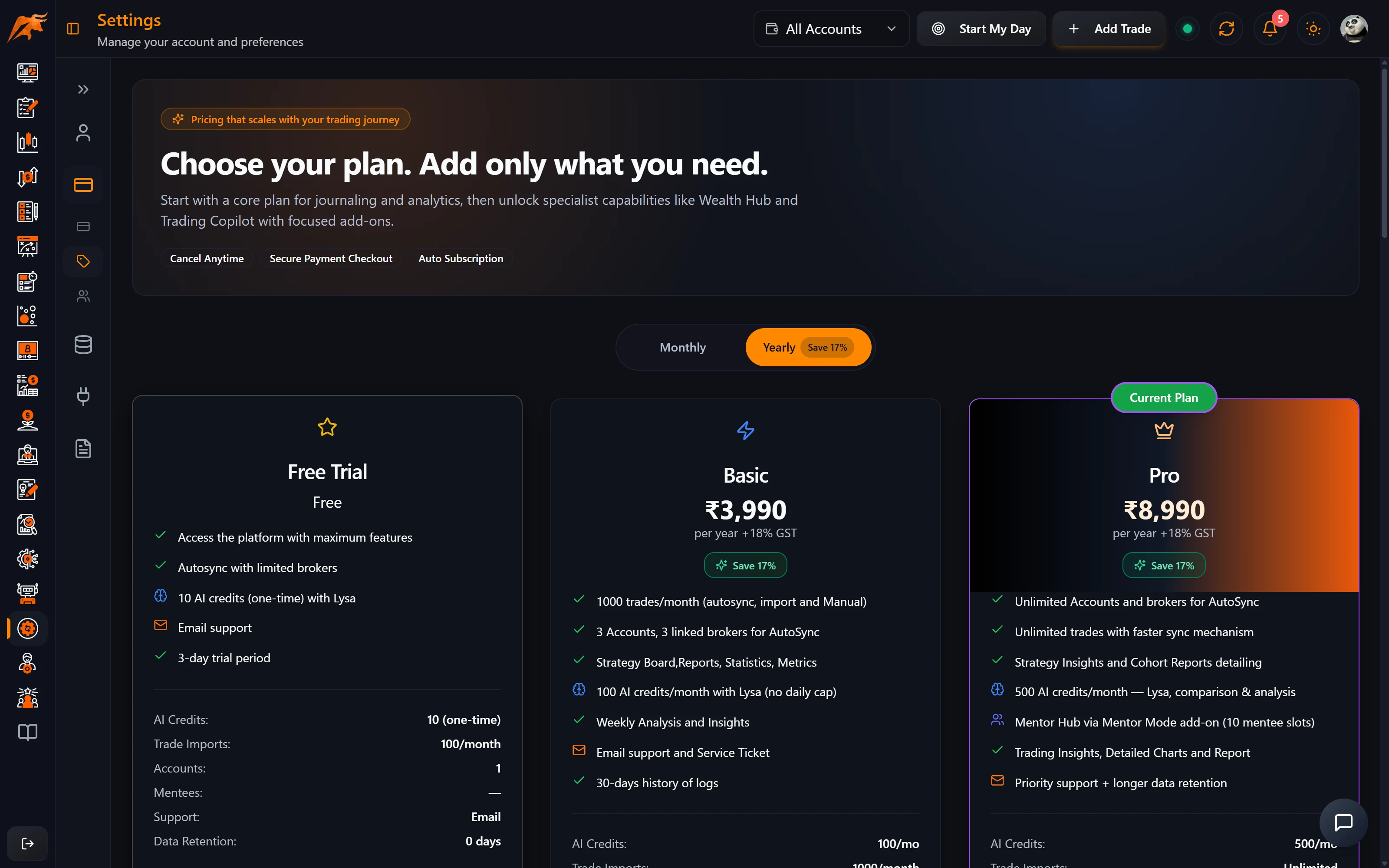
This page explains how paying for TradeLyser works, from the free trial to renewals, add-ons, GST invoices and cancelling. Use it as a map, then follow the links for step-by-step guides. Everything to do with billing lives in Settings under Subscriptions: Manage (your plan, usage and invoices) and Pricing (plans, current prices and add-ons).
On this page:
- How the trial, Basic and Pro plans are billed.
- How payment, renewal and invoices work.
- What happens when you change plan, cancel or a plan lapses.
Prices change from time to time, so this documentation doesn't list them. Open Settings → Pricing to see today's monthly and yearly prices. They're shown before 18% GST, and the checkout page shows the GST and the final amount before you pay.
Plans at a glance
| Plan | How it's billed | Highlights (from the in-app plan table) |
|---|---|---|
| Free Trial | Free for 3 days. One per person, no card needed. | Dashboard, Daily Journal, Trades Log, Open Positions, Strategy Lab, Wealth Hub, Reports and Accounts, with a small trade-import allowance and a starter allowance of AI credits. |
| Basic | Monthly or yearly, renews automatically | Everything in Trial plus Notebook, AI Analytics and Mentor Comments, with a much higher monthly trade-import limit. |
| Pro | Monthly or yearly, renews automatically | Everything in Basic plus Trade Insights, Discipline Diary, World Indices, Trade Replays, Backtesting and Lysa Copilot, with the highest limits. |
Each plan also comes with a monthly AI-credit allowance and limits on trade imports and accounts. The plan cards on Settings → Pricing list them side by side. For a fuller comparison, see Compare plans.
How you pay
- On Settings → Pricing, choose Monthly or Yearly (yearly is discounted) and click Choose Plan.
- The checkout page shows the price, GST (18%) and the Final Price to Pay.
- Fill in your Billing Details (name, WhatsApp number, address, PIN code and state). Tick I have a GST Number to add your GSTIN. These details are printed on your tax invoice.
- Accept the terms and click Pay. Payment is completed in the Razorpay window by card, UPI, net banking or wallet.
- You'll see Payment successful! Subscription activated.
Step-by-step guides: Upgrade to Basic and Upgrade to Pro.
Renewal
Basic and Pro renew automatically at the end of each monthly or yearly period. The checkout page says so before you pay, and the Subscription Details card on Settings → Subscription shows Auto-renew: On, the Next billing date and the Next charge. To stop future renewals, cancel the subscription (see below).
Add-ons
Add-ons are bought separately from your plan on Settings → Pricing → Add-ons. They're one-off purchases for the period you choose and don't renew automatically. TradeLyser prompts you to renew when one is about to expire.
| Add-on | What it adds | Requires |
|---|---|---|
| Wealth Hub | Long-term portfolio tracking, goals, tax, risk and the Investor Council | Any plan, including Trial |
| Trading Copilot | Lysa's AI agents for tagging, notes, strategy mapping, market Q&A and planning (uses your AI credits) | Pro |
| Mentor Mode | Mentor dashboard with 10 mentee slots, Copilot reviews and Academy | Pro |
| Mentor Pro | Extra mentee slots in packs | Mentor Mode |
| AI Top-ups | Extra AI credits for 30 days, on top of your plan | Basic or Pro |
Invoices and GST
A GST tax invoice is created within about 10 minutes of each payment and emailed to you. Download it any time from Settings → Subscription → Tax Invoices by clicking PDF. Your GSTIN, if you added it at checkout, is shown under Tax profile and used on all future invoices. See Billing history and invoices.
Changing your plan
On Settings → Subscription, the Manage Subscription card shows Choose Plan (Trial), Upgrade Plan (Basic) or Downgrade Plan (Pro). Each takes you to Pricing, where you choose the new plan and pay at checkout. Your new plan becomes active once the payment is captured.
Cancelling and grace period
Click Cancel Subscription on Settings → Subscription, choose a reason and confirm. Auto-renew is turned off and you keep full access until the end of the period you've paid for. See Cancel your subscription.
After a paid plan ends you get a short grace period in read-only mode. A banner shows the time remaining and an Upgrade Now button. The Subscription page and the documentation stay available. Export anything you need before then, for example with Download CSV in the Trades Log.
Refunds
Payments are non-refundable, except for duplicate or excess charges and payments that didn't activate your subscription. Cancelling stops the next renewal but doesn't return money for the current period. See Request a refund.
Troubleshooting billing
| Problem | Fix |
|---|---|
| The Razorpay window doesn't open | Allow pop-ups for app.tradelyser.com, disable script blockers for the page and try again. |
| Paid, but the plan didn't change | Wait a minute and refresh Settings → Subscription. If it still shows the old plan, email support@tradelyser.com with your payment reference. |
| "Payment issue detected" on the Subscription page | A renewal payment failed. Follow the prompt, or contact support. |
| No invoice yet | Invoices are generated within about 10 minutes of a payment. Check your email too. |
| Free Trial button is disabled | The trial is one per person. You'll see "You've already used your free trial". Choose Basic or Pro. |
Frequently asked questions
How much does TradeLyser cost?
Current monthly and yearly prices for Basic and Pro are on Settings → Pricing in the app. They're shown before 18% GST.
Does TradeLyser have a free trial?
Yes. The Free Trial lasts 3 days, needs no card and is available once per person. See Start your free trial.
Which payment methods does TradeLyser accept?
Card, UPI, net banking and wallets, through Razorpay.
Does my subscription renew automatically?
Yes. Basic and Pro renew automatically until you cancel. Add-ons don't renew automatically.
Can I get a GST invoice?
Yes. Every payment generates a GST tax invoice, emailed to you and downloadable as a PDF from Settings → Subscription.