Trade Insights: Compare Periods and Read Your Weekly Brief
Compare shows whether you improved against the previous period of the same length. Weekly Brief gives a quick recap of any date range with rule-based insights and an optional AI narrative that ends with one thing to focus on next. Together they make a ten-minute weekly review.
Availability: Pro plan. Open them at app.tradelyser.com/trades-analysis/compare and app.tradelyser.com/trades-analysis/brief.
Both tabs use the date range at the top right (last 12 months by default) and the account selected in the header, and work on closed trades only. See How Trade Insights works for the shared rules.
Compare
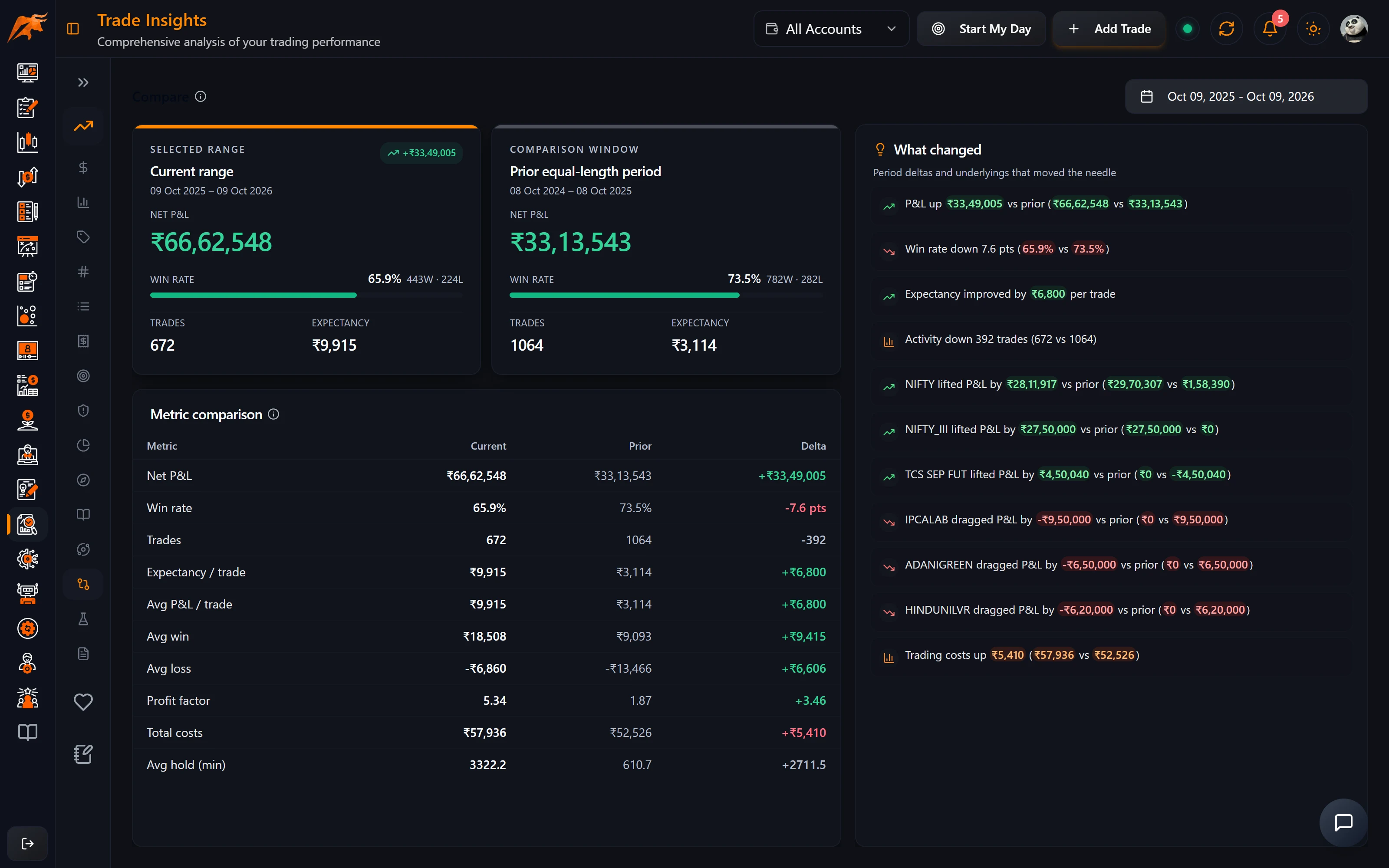
Compare puts your selected date range side by side with the period just before it.
- The previous period is the same length as your date range and ends just before it starts. For example, 1 Sept – 30 Sept is compared with 2 Aug – 31 Aug.
- Summary cards show net P&L, win rate, trades and expectancy for both periods.
- The comparison table adds average P&L, average win and loss, profit factor, total costs and average holding time.
- What changed lists the biggest movements, including the three underlyings that improved and the three that worsened most.
| To compare | Set the date range to |
|---|---|
| This week vs last week | Monday to Friday of this week |
| This month vs last month | The first to the last day of this month |
| This quarter vs last quarter | The three months of this quarter |
If your average loss got ₹1,200 worse while your win rate went up, you are probably taking profits early and letting losers run. Review your stop-loss discipline, and test a Cap at stop scenario in What If.
Compare tells you whether something changed. To find why, open the matching tab: P&L Analysis for time and symbol, Expectancy for edge per trade, or Fees & Tax if total costs jumped. For a longer view of progress, see Track strategy performance over time on the TradeLyser site.
Weekly Brief
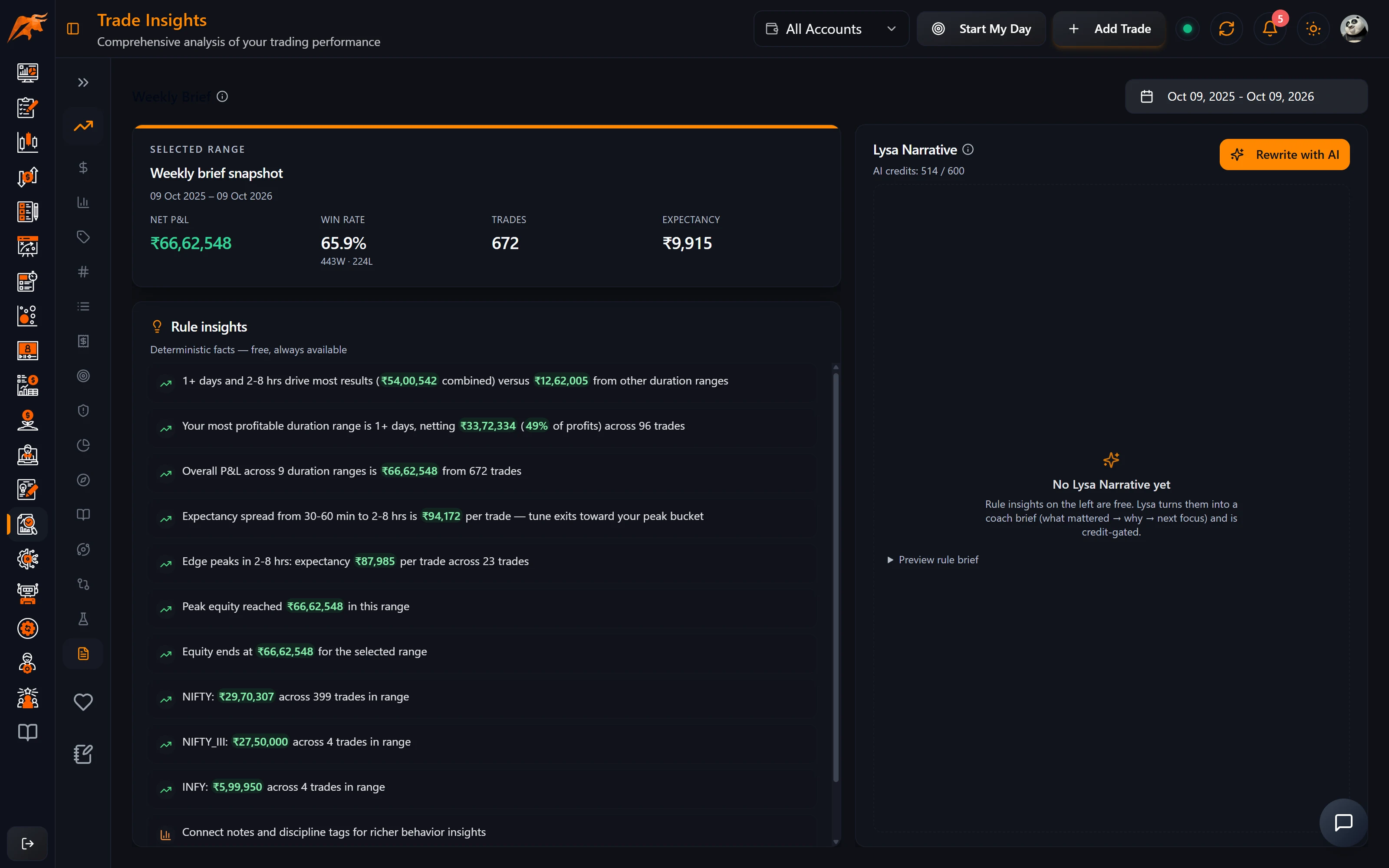
- Set the date range to the week you want to review. The brief uses whatever range is selected, which is 12 months by default, so change it before you read.
- Read the snapshot (net P&L, win rate, trades, expectancy) and the rule insights on the left. These are free.
- With a single account selected, click Rewrite with AI for the Lysa Narrative: What mattered most, Why it stands out and Focus next week. This uses 1 AI credit.
- Copy the Focus next week line into your Start My Day checklist.
| Part of the brief | Source | Cost |
|---|---|---|
| Snapshot | Your closed trades in the range | Free |
| Rule insights | TradeLyser's rules engine | Free |
| Lysa Narrative | Lysa ranks the rule insights into a short coach brief | 1 AI credit per rewrite |
The Lysa Narrative works from the insight facts already on the page, so it doesn't invent new numbers. To get the most from it, see Using AI recommendations in trading.
How to use it in your routine
Once a week, for example on the weekend:
- In Trade Insights, set the date range to last week and read the Weekly Brief. Use Rewrite with AI for a Focus next week line.
- Open Compare to see whether you improved on the week before.
- Check Expectancy and P&L by time for leaks.
- Turn one leak into a Playbook rule or a Discipline Diary rule.
For a broader review checklist, see How to review your trading journal.
Troubleshooting
| Problem | Fix |
|---|---|
| The brief covers a year, not a week | The brief uses the selected date range (12 months by default). Set the range to the week you want. |
| Rewrite with AI is greyed out | It needs rule insights in the range, the Pro plan and AI credits remaining. Select a single account rather than All Accounts. |
| The credits line says top up needed | You have no AI credits left. The snapshot and rule insights still work. |
| Numbers differ from the dashboard | Trade Insights filters trades by exit date and only counts closed trades. Check that both use the same account and dates. |
Frequently asked questions
How do I compare this month's trading with last month in TradeLyser?
Set the date range to this month and open Trade Insights → Compare. TradeLyser compares it with the previous period of the same length and lists what changed.
Does the Weekly Brief cost AI credits?
The snapshot and rule insights are free. Only Rewrite with AI, which writes the Lysa Narrative, uses 1 AI credit.
Do I need to select a single account for the Weekly Brief?
For the Lysa Narrative, yes. Rewrite with AI needs a single account selected in the header, rather than All Accounts.
What is the Lysa Narrative in the Weekly Brief?
It is a short coach-style summary written by Lysa, TradeLyser's AI assistant, when you click Rewrite with AI. It ranks the rule insights already on the page into three parts: What mattered most, Why it stands out and Focus next week. It doesn't add numbers that aren't in your data, and each rewrite uses 1 AI credit.
Which metrics does Compare show?
Net P&L, win rate, trades, expectancy, average P&L, average win and loss, profit factor, total costs and average holding time.