Wealth Hub Goals & FIRE, Tax, Risk and Alerts
These four Wealth Hub pages turn your holdings into a plan. Goals & FIRE tells you whether your SIPs are enough, Tax shows the capital gains sitting in your open lots, Risk measures how concentrated and volatile your portfolio is, and Alerts tells you when something needs a look.
Availability: Wealth Hub add-on, available on any plan including Trial. Open the pages at app.tradelyser.com/wealth-hub/goals, /wealth-hub/tax, /wealth-hub/risk and /wealth-hub/alerts.
Every figure here comes from your synced holdings and manual assets, so set up Wealth Hub first.
Goals & FIRE
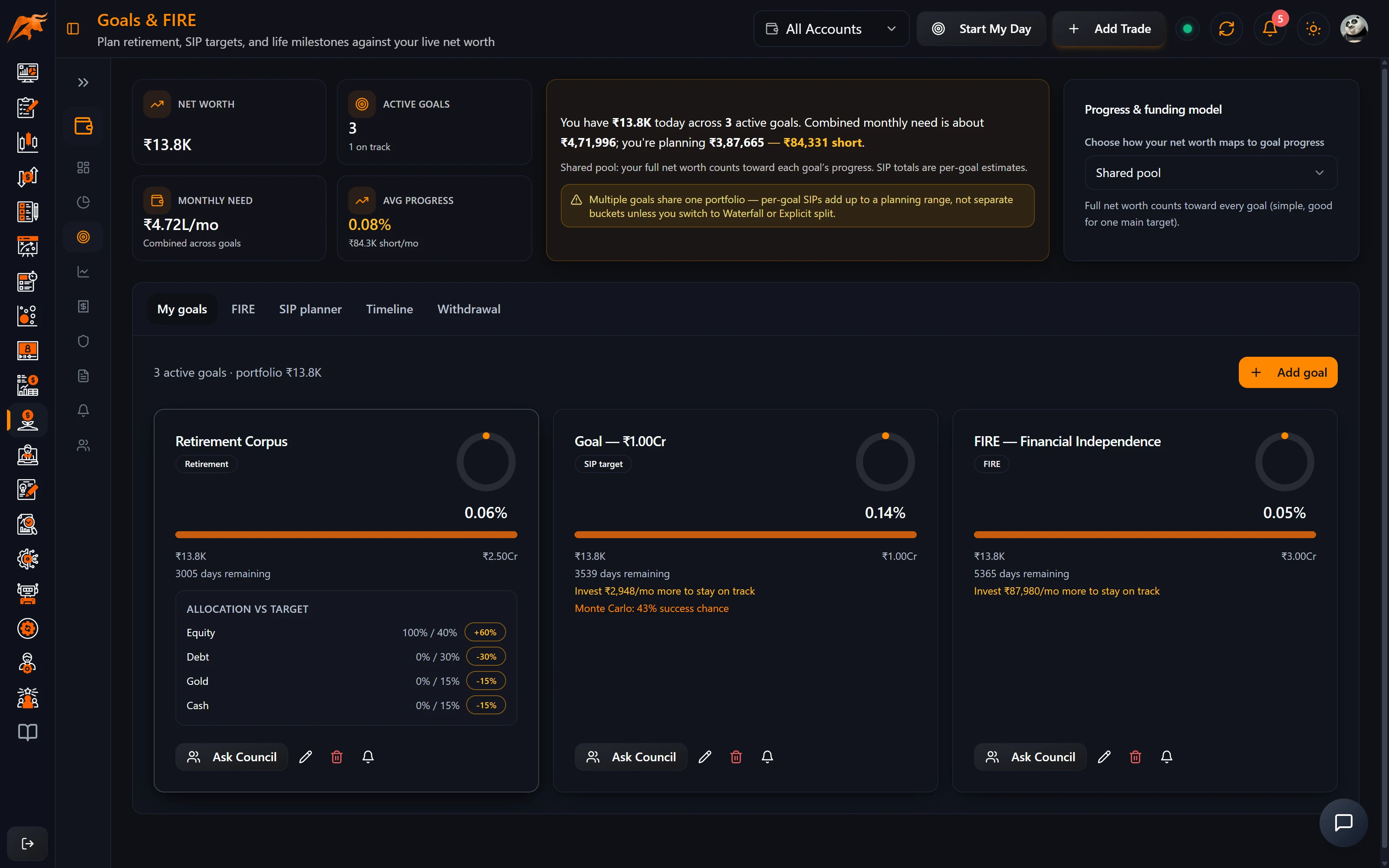
Create a goal
- Click to create a goal and enter its name, type (retirement, FIRE, education, house, wedding, sabbatical, SIP or generic), target date, target amount, planned monthly SIP and expected inflation (6% by default).
- Optionally set a target asset allocation, a priority, whether it is your primary goal, and how much of your current portfolio is assigned to it.
- Choose how your net worth is shared between goals:
| Allocation mode | How it works |
|---|---|
| Shared pool | All goals draw on the same net worth. |
| Priority waterfall | Fills goals in priority order. |
| Explicit split | You decide how much goes to each goal. |
| Primary goal only | Your net worth counts towards your primary goal only. |
Read a goal
| Figure | Meaning |
|---|---|
| Inflation-adjusted target | Your target amount grown by the expected inflation up to the target date. |
| Required SIP | The monthly SIP needed to reach the target, assuming a 12% annual return. |
| SIP gap | The difference between the required SIP and your planned SIP. |
| On track | Progress is ahead of schedule, or your planned SIP covers what's needed. |
Click Run Monte Carlo to simulate many market paths and see the probability of success and a range of outcomes, rather than relying on a single fixed return.
FIRE, SIP planner, timeline and withdrawal
- FIRE: your FIRE number is annual expenses ÷ safe withdrawal rate (4% by default).
- SIP planner and Timeline: plan contributions and see all your goals over time.
- Withdrawal: compare withdrawal rates from 3% to 4.5%, see how long your corpus lasts, and get a suggested split into liquidity, income and growth buckets.
The 12% return, 6% inflation and 4% withdrawal rate are TradeLyser's defaults for planning, not forecasts. Change the inflation and withdrawal inputs to match your own assumptions.
Tax
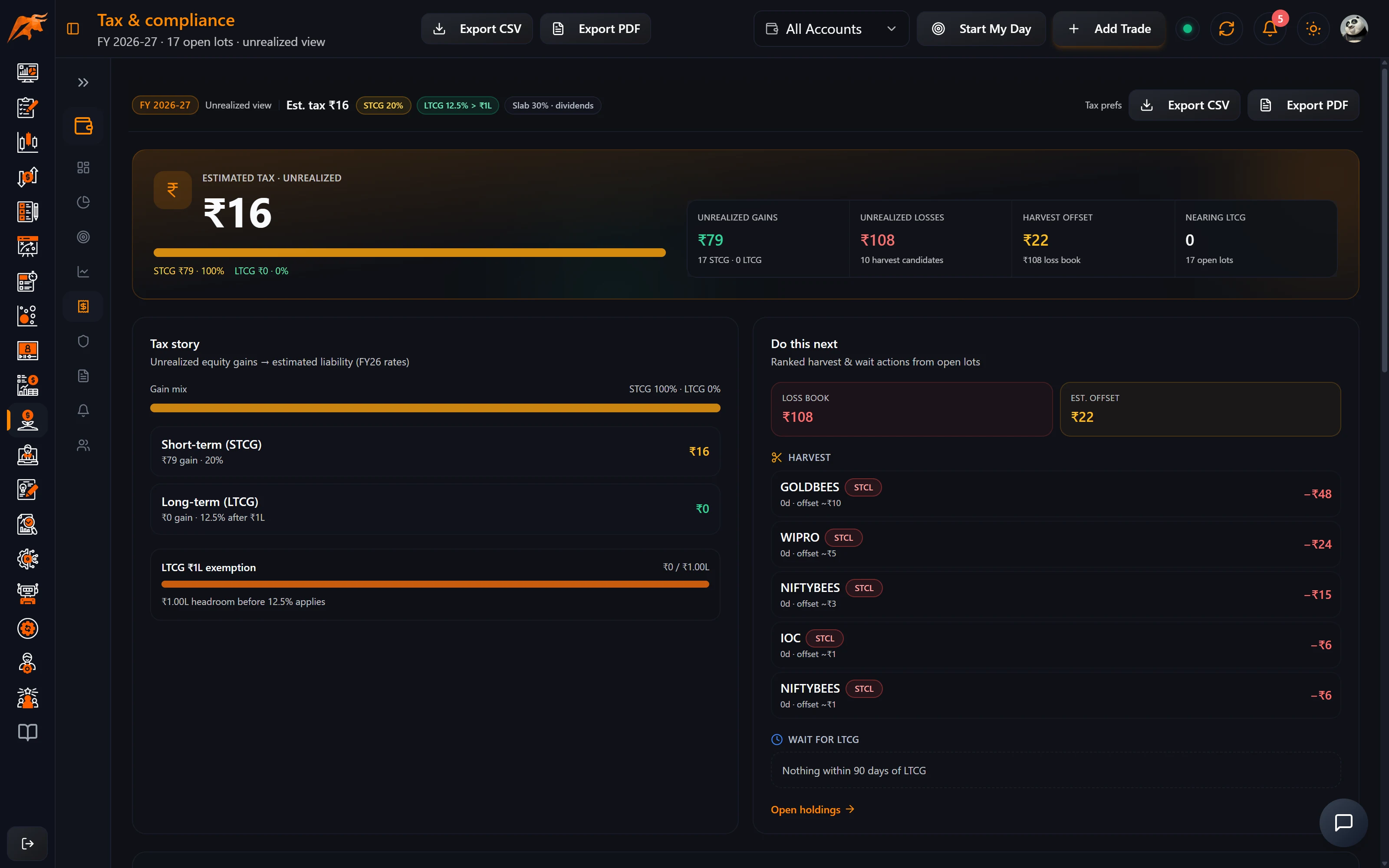
The Tax page shows the capital gains in your open lots for the current financial year (April–March), so you can plan sales before you make them.
| Section | What it shows |
|---|---|
| Unrealised STCG and LTCG | Your unrealised short-term and long-term capital gains on open lots, and the estimated tax on them. |
| Harvesting | Lots currently at a loss, and the tax they could offset if you booked the loss. |
| Nearing LTCG | Lots that turn long-term within 90 days. Waiting may lower the tax on them. |
| 80C meter | Your PPF, EPF, NPS and ELSS against the Section 80C limit. |
| Export | The capital-gains schedule as PDF or CSV for your accountant. |
For equity, TradeLyser uses the current equity rates shown in the app, STCG 20% and LTCG 12.5% above the annual exemption, and treats equity as long-term after one year. For the 80C meter, TradeLyser uses a ₹1.5 lakh limit. Your income tax slab and 80C, 80CCD(1B) and 80D amounts are set in Settings → Wealth Hub.
The Tax page gives planning estimates, not tax advice. The rates, limits and holding periods TradeLyser uses can change and may not cover your situation. The figures also depend on accurate purchase dates and costs, so fix any holding whose cost basis badge on Holdings isn't Verified or Confirmed. Confirm everything with a tax professional before you sell or file.
Risk
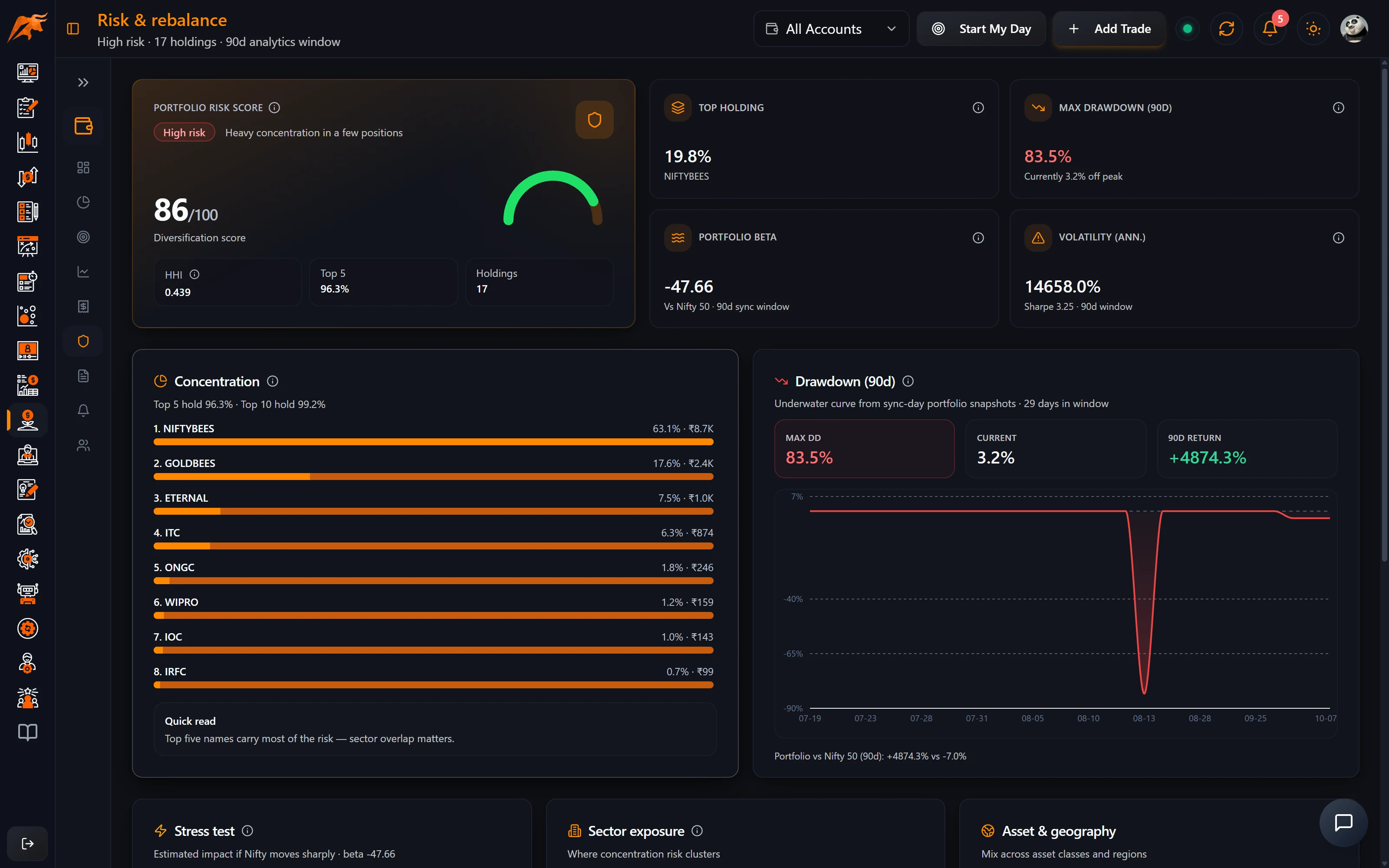
| Measure | Meaning in Wealth Hub |
|---|---|
| Risk level | High when your top five holdings are 70% or more of the portfolio or concentration is high; Moderate at 50% or more; otherwise Low. |
| Max / current drawdown | The largest and the current fall from a peak over the last 90 days. |
| Beta | How much your portfolio moves for each 1% move in Nifty. A beta of 1.2 means about 20% more volatile than the market. |
| Volatility and Sharpe | Annualised swings, and the return earned per unit of risk. |
| Stress test | Estimated loss if Nifty fell 10%, 20% or 30%, based on your beta. |
The page also shows sector, asset and geographic exposure, rebalance suggestions and any breaches of the investment rules you set in Settings → Wealth Hub (for example a maximum single-stock %). For more on reading drawdown, see max drawdown.
Alerts
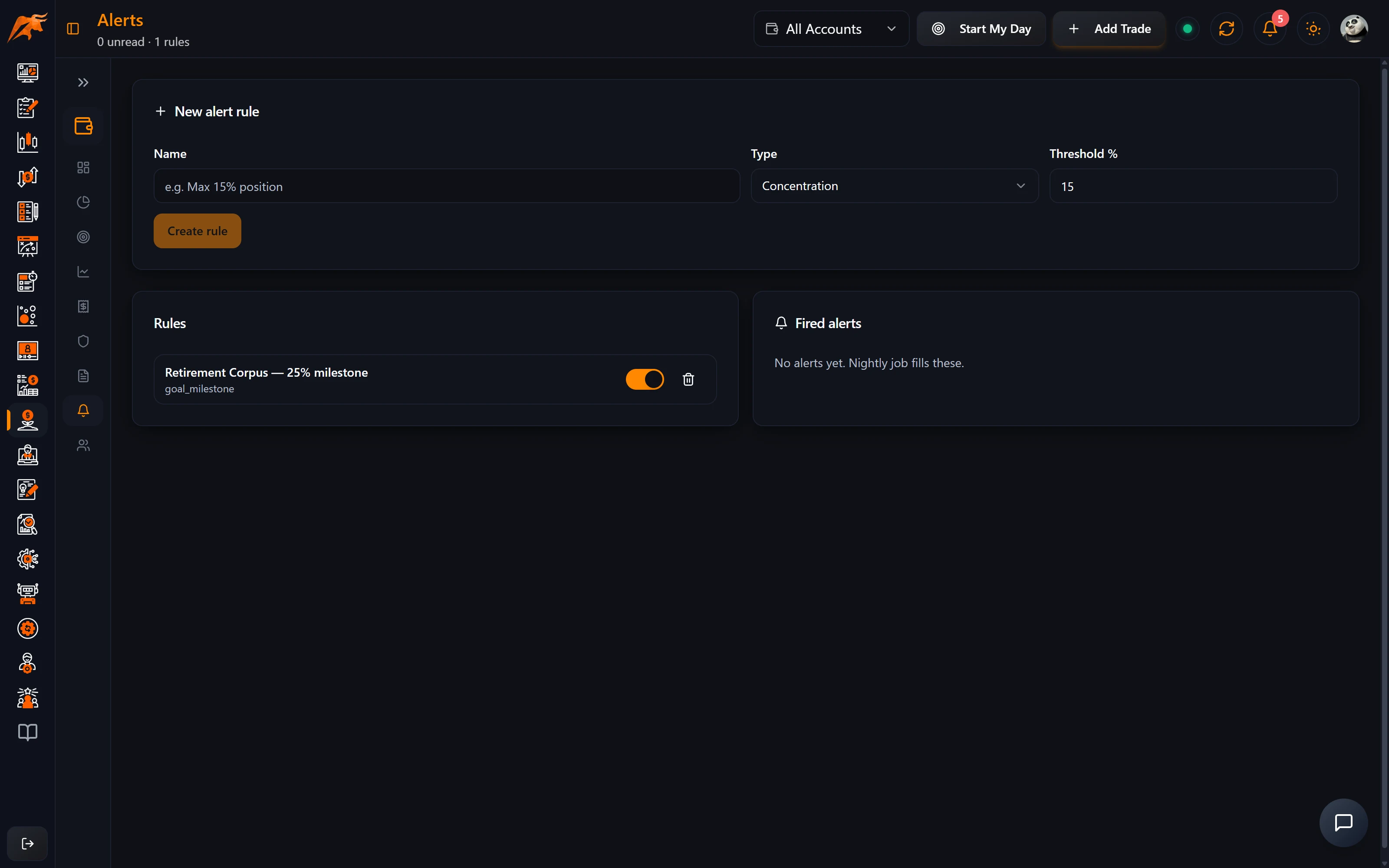
Create alert rules
- Open Alerts and create a rule. Types: concentration, drawdown, allocation drift, price change, sync failure, tax-harvest season and goal milestones.
- Set a threshold where relevant (15% by default).
- Switch rules on or off, or delete them, at any time.
Work with fired alerts
- Fired alerts appear on this page and in the dashboard's Needs attention widget, marked info, warning or critical.
- Read marks an alert as read; Snooze hides it from the dashboard for 24 hours.
- Alerts are checked overnight, so a rule you create today fires from the next check.
- Turn on Portfolio notifications in Settings → Wealth Hub to be notified as well.
How to use it in your routine
- Weekly: clear alerts in Needs attention and glance at the Risk level.
- Monthly: check each goal's SIP gap and rerun Run Monte Carlo after big market moves.
- Before selling: open Tax to check Nearing LTCG and Harvesting, then confirm with your tax professional.
Troubleshooting
| Problem | Fix |
|---|---|
| Goal progress looks wrong | Check the allocation mode and how much of your portfolio is assigned to the goal. |
| Tax figures look wrong | Add missing purchase dates and costs via the cost basis badge on Holdings; lots update on the next sync. |
| Drawdown, beta or volatility are empty | These need a history of daily snapshots; let a few syncs run. |
| An alert didn't fire | Check the rule is switched on. Alerts are checked overnight. |
Frequently asked questions
How does TradeLyser calculate my FIRE number?
Annual expenses ÷ safe withdrawal rate, with 4% as the default rate.
Does TradeLyser calculate capital gains tax on my portfolio?
It estimates tax on unrealised gains in your open lots for the current financial year. Treat it as a planning estimate and confirm with a tax professional.
Can TradeLyser show tax-loss harvesting opportunities?
Yes. Harvesting on the Tax page lists lots at a loss and the tax they could offset if booked.
What does the risk level in Wealth Hub mean?
It is based on concentration: High when your top five holdings are 70% or more of the portfolio (or concentration is high), Moderate at 50% or more, otherwise Low.