Investor Council and Wealth Hub Reports
The Investor Council asks a panel of AI investors, each modelled on the style of a well-known investor, to review your portfolio, one holding, a goal or any listed stock, then debates their views into one summary. Reports gives you exportable summaries of everything in Wealth Hub, and the weekly digest emails the headline numbers every Saturday.
Availability: Wealth Hub add-on, available on any plan including Trial. Council runs also use AI credits. Open the pages at app.tradelyser.com/wealth-hub/council and /wealth-hub/reports.
Investor Council
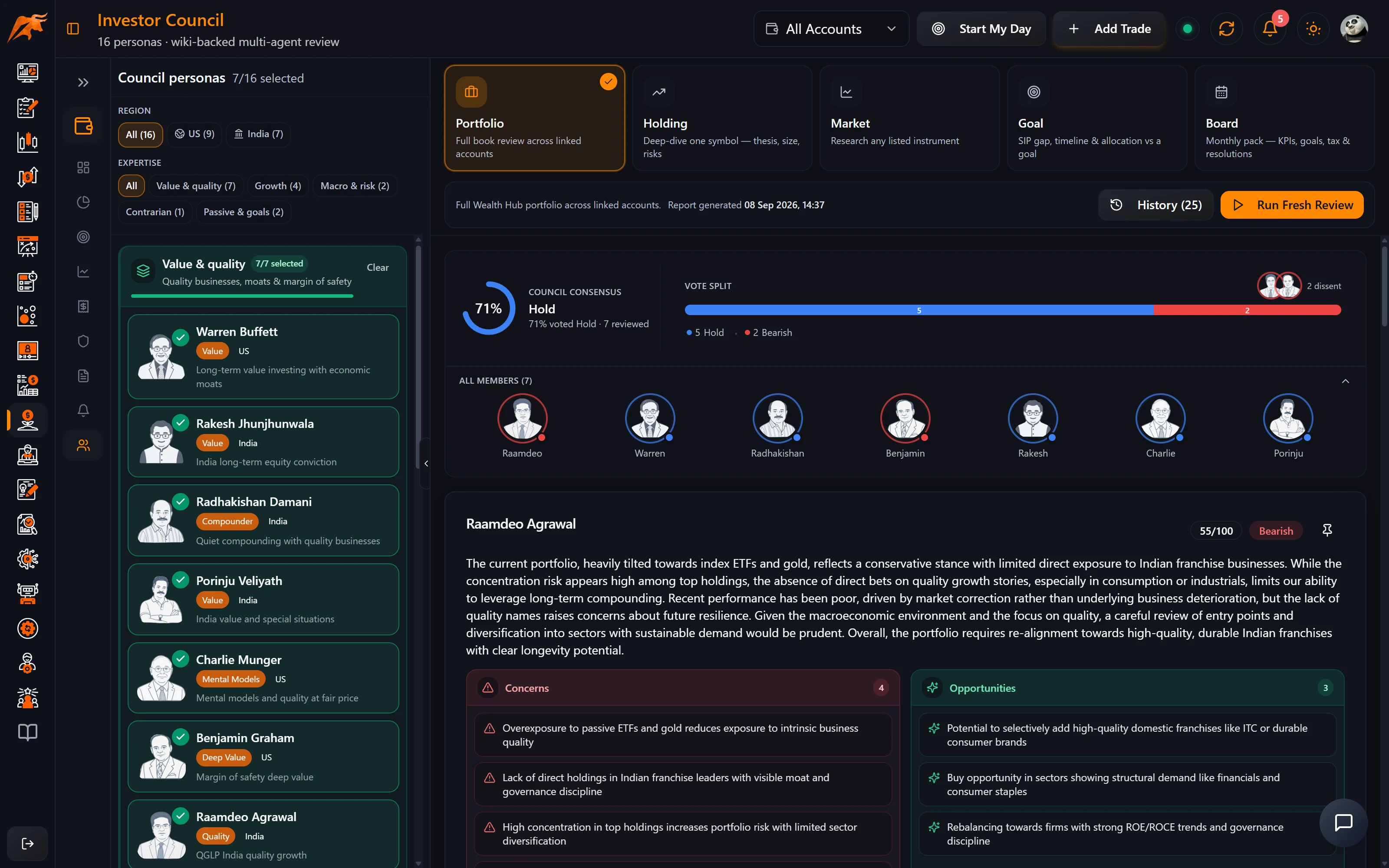
Review modes
| Mode | What it reviews | Default panel |
|---|---|---|
| Portfolio | Your whole portfolio | Buffett, Jhunjhunwala |
| Holding | One stock you own | Jhunjhunwala, Damani, Agrawal, Halan |
| Market | Any listed stock, owned or not | Buffett, Jhunjhunwala |
| Goal | One goal: SIP gap and timeline (no stock tips) | Bogle, Halan |
| Board | A monthly board-style review | Six members |
Personas
Sixteen personas are available, each with its own style: value (Buffett, Graham, Munger), growth at a reasonable price (Lynch), macro (Dalio), Indian market veterans (Jhunjhunwala, Damani, Kedia, Agrawal, Andrade, Porinju), passive investing (Bogle), personal finance (Monika Halan) and more. You can change the panel before each run.
Run a review
- Open Council and pick a mode.
- For Holding, Market or Goal, choose the stock or goal to review.
- Adjust the panel if you want different perspectives. Each extra persona costs one more credit.
- Click Run Fresh Review.
- Read the result: each persona gives a stance, a score, concerns and actions, and the summary combines them into a debate and a stance matrix.
| Item | Details |
|---|---|
| Cost | 1 AI credit plus 1 per persona on the panel. A two-person panel uses 3 credits. |
| Knowledge base | Except in Market mode, the Council needs your portfolio knowledge base, built from your synced holdings and refreshed weekly. |
| History | Keeps your last 25 runs. |
| Monthly board review | Runs automatically and notifies you when it's ready. |
The latest Council summary also appears in the Morning brief widget on the Wealth Hub dashboard.
Council opinions are AI-generated perspectives inspired by investing styles. They are not the views of those individuals and are not investment advice.
For how to weigh AI suggestions before acting on them, see using AI recommendations in trading.
Reports and the weekly digest
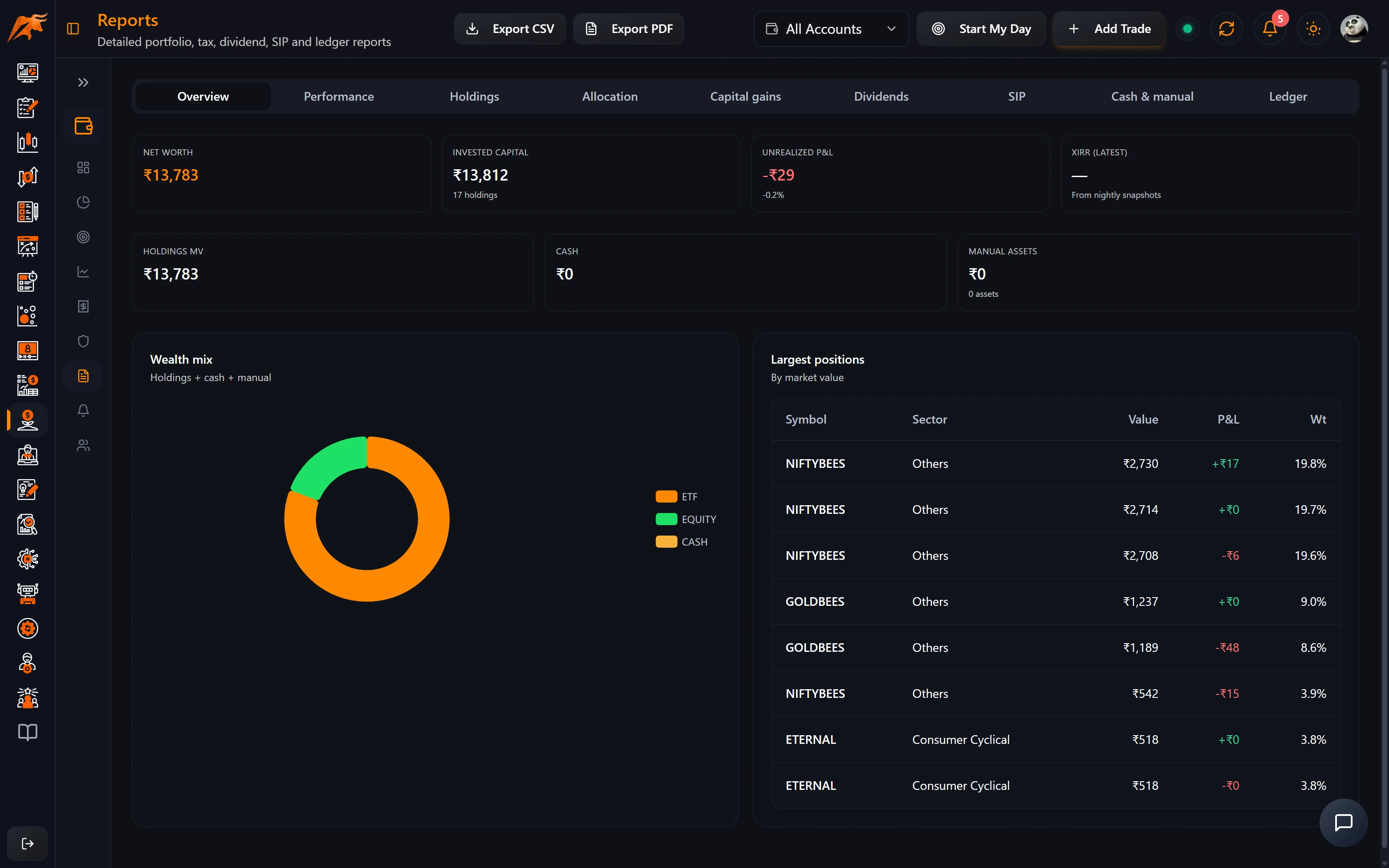
Reports has one tab for each part of Wealth Hub:
| Tab | What it contains |
|---|---|
| Overview | A summary of your portfolio. |
| Performance | Returns over time. |
| Holdings | Your current holdings. |
| Allocation | How your money is split. |
| Capital gains | Your capital-gains figures (see the Tax page for how they are estimated). |
| Dividends | Dividend income. |
| SIP | Your SIPs. |
| Cash & manual assets | Cash and the assets you added by hand. |
| Ledger | The transaction ledger. |
Export the active tab as PDF, or any tab as CSV.
Turn on the weekly digest
- Go to Settings → Wealth Hub.
- In Sync & notifications, set Weekly digest email to Weekly (Saturday).
- Every Saturday morning you get an email with your portfolio value, P&L and recent alerts.
How to use it in your routine
- Saturday: read the weekly digest, then open the dashboard to clear anything in Needs attention.
- Monthly: read the automatic monthly board review when the notification arrives.
- Before a big decision on a holding: run a Holding review and compare the concerns with your own thesis notes on the holding.
- Year end: export the Capital gains tab as CSV for your accountant.
Troubleshooting Wealth Hub
| Problem | What to do |
|---|---|
| An account is missing from Sync Holdings | Only Auto Sync accounts can sync holdings. See Wealth Hub setup. |
| Account shows Needs re-auth | Your broker login expired. Click Re-auth to Sync. |
| A sync failed | Open Settings → Wealth Hub Sync History and click the eye icon for the error. |
| XIRR or charts are empty | Let a few daily syncs run so snapshots build up. |
| The Council button is disabled | Sync your holdings and wait for the weekly knowledge-base build. Market mode doesn't need it. |
| Council shows an AI-credits error | Top up AI credits or wait for your monthly renewal. |
For broker login problems, see Troubleshoot broker connection.
Frequently asked questions
Can AI review my stock portfolio in TradeLyser?
Yes. The Investor Council's Portfolio mode reviews your whole synced portfolio with a panel of AI personas and combines their views into one summary.
How many AI credits does an Investor Council review use?
1 credit plus 1 per persona on the panel, so a two-person panel uses 3 credits.
Can I ask the Council about a stock I don't own?
Yes. Market mode reviews any listed stock, and it doesn't need your portfolio knowledge base.
Can I export my Wealth Hub portfolio report?
Yes. On Reports, export the active tab as PDF or any tab as CSV.