How to Upgrade to the TradeLyser Pro Plan
Pro is TradeLyser's top plan. It includes everything in Basic plus Trade Insights, the Discipline Diary, World Indices, Trade Replays, Backtesting and Lysa Copilot, with the highest limits and the largest monthly AI-credit allowance. Pro is also required for the Trading Copilot and Mentor Mode add-ons. This guide covers upgrading from the Free Trial or from Basic. It takes about three minutes.
Once you're on Pro you can:
- Use every TradeLyser feature, including Trade Replays and Backtesting.
- Work with the highest trade-import and account limits.
- Add Trading Copilot, or Mentor Mode to coach mentees.
What you need
| Requirement | Notes |
|---|---|
| A signed-in TradeLyser account | On the Free Trial, Basic, or a lapsed plan. |
| Billing details | Name, WhatsApp number, address, PIN code and state, printed on your GST invoice. |
| Your GSTIN (optional) | Tick I have a GST Number at checkout. |
| A payment method | Card, UPI, net banking or wallet, through Razorpay. |
The Pro price is shown on Settings → Pricing, monthly and yearly, before 18% GST. The checkout page shows the GST and the final amount before you pay.
Step 1: Open Pricing
- On Settings → Subscription, click Upgrade Plan (Basic) or Choose Plan (Trial).
- Or open Settings → Pricing directly, under Subscriptions.
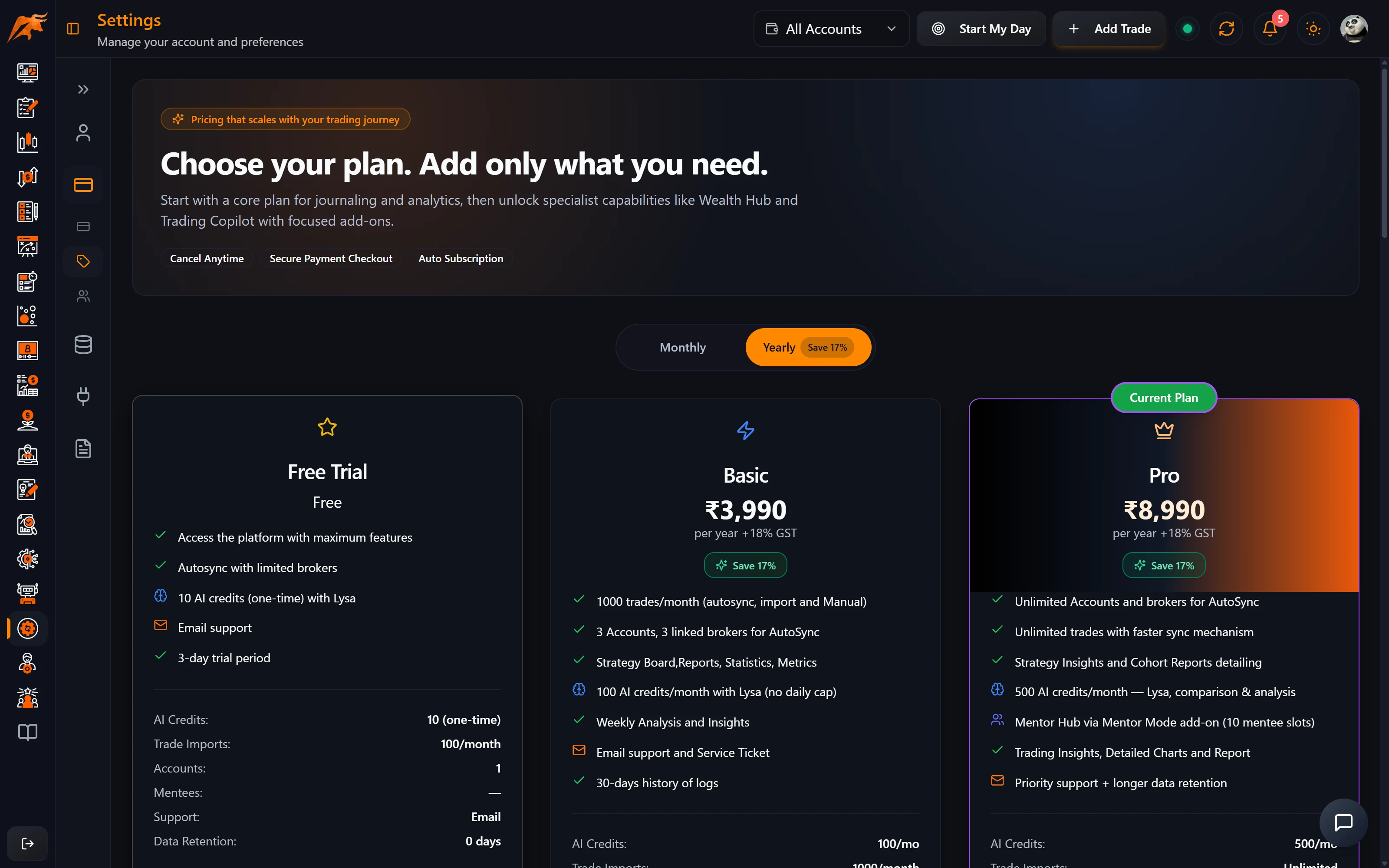
Step 2: Choose a billing cycle and the Pro plan
- Use the Monthly / Yearly toggle. Yearly is discounted.
- On the Pro card, click Choose Plan.
You go to Complete Your Subscription, which shows Pro Plan with Monthly billing or Annual billing.
Step 3: Check the amount
Check Price, GST (18%), Price with GST and Final Price to Pay. The final price is what you'll be charged.
Step 4: Fill in billing details and accept the terms
- Under Billing Details, complete Full Name, WhatsApp Number, Address, PIN Code and State.
- Optionally tick I have a GST Number and enter your GST Number.
- Tick all three boxes: the Terms and Conditions and Refund Policy, the no-refund statement, and the statement that TradeLyser doesn't provide buy or sell calls.
Step 5: Pay
- Click Pay.
- Complete the payment in the Razorpay window by card, UPI, net banking or wallet.
- Wait for Subscription enablement in progress, then Payment successful! Subscription activated.
When the payment is captured, Pro becomes your active plan and replaces your trial or Basic subscription. Settings → Subscription then shows Pro Monthly or Pro Yearly with its renewal date.
Pro starts as a new subscription once you pay at checkout, and your Basic subscription is closed. If you have questions about the unused part of a Basic period, email support@tradelyser.com before you upgrade.
What Pro adds
| Feature | What it's for | Guide |
|---|---|---|
| Trade Insights | Deep analysis of P&L, risk, expectancy, playbook and what-if scenarios | Trade Insights: P&L |
| Trade Replays | Replay a trade bar by bar | Trade Replays |
| Backtesting | Test ideas on historical data | Backtesting |
| Discipline Diary | Rules and check-ins for trading discipline | Create discipline rules |
| World Indices | Global markets on a single map, to read overnight and live sentiment before and during the Indian session | — |
| Lysa Copilot | AI agents that propose tags, notes, strategy mappings and plans for you to approve | — |
Pro also unlocks Pro-only Settings pages such as Voice Settings, Trade Replay, Discipline Diary Settings, Trading Preferences, Health Integrations and WHOOP.
Pro add-ons
These are bought separately on Settings → Pricing → Add-ons, or with Buy Add-ons on the Subscription page. They're one-off purchases for the period you choose and don't renew automatically.
| Add-on | What it adds |
|---|---|
| Trading Copilot | Lysa's AI agents for tagging, notes, strategy mapping, market Q&A and planning. Uses your AI credits. |
| Mentor Mode | Mentor dashboard with 10 mentee slots, Copilot reviews and Academy. |
| Mentor Pro | Extra mentee slots in packs (needs Mentor Mode). |
| AI Top-ups | Extra AI credits for 30 days. |
After you upgrade
- Items that showed a PRO badge in the sidebar are unlocked.
- Usage This Period on Settings → Subscription shows your Pro limits and AI credits.
- Your GST invoice is created within about 10 minutes and emailed to you. See Billing history and invoices.
- Pro renews automatically until you cancel. To move back to Basic later, use Downgrade Plan on Settings → Subscription.
Troubleshooting
| Problem | Fix |
|---|---|
| Pro features still locked after paying | Refresh the page. If Settings → Subscription still shows your old plan after a few minutes, email support@tradelyser.com with your payment reference. |
| Payment failed. Please try again. | Try another payment method, or check with your bank. |
| The Razorpay window doesn't open | Allow pop-ups for app.tradelyser.com and try again. |
| Can't buy Trading Copilot or Mentor Mode | Both need Pro. Upgrade first, then buy the add-on. |
| Charged twice | See Request a refund. Duplicate charges are refunded. |
Frequently asked questions
What does TradeLyser Pro include?
Everything in Basic plus Trade Insights, Discipline Diary, World Indices, Trade Replays, Backtesting and Lysa Copilot, with the highest limits.
How do I upgrade from Basic to Pro?
Click Upgrade Plan on Settings → Subscription, choose Pro on the Pricing page and pay at checkout.
Do I need Pro for Mentor Mode?
Yes. Mentor Mode is an add-on that requires Pro.
Can I downgrade from Pro later?
Yes. Use Downgrade Plan on Settings → Subscription, which takes you to Pricing to choose Basic.